Movicon.NExT Help on Line - Rel. 4.2.355
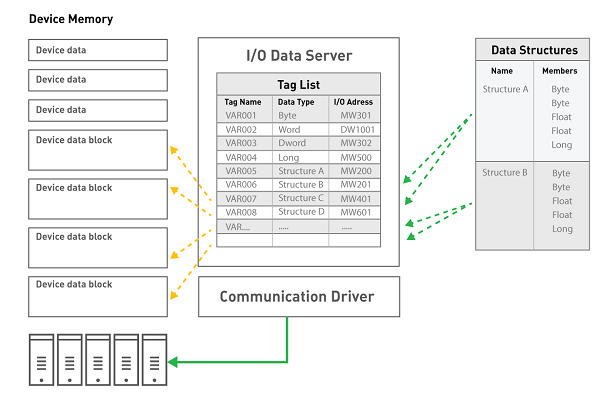
The I/O Data Server's Data Structure is used to add and configure freely configurable data models defined as "Structure" or "UDT" (User-defined Data Type).
The data structures are used to define complex tag types which have models composed of a series of components called members.
Members and folders can be added within a Data Structure at multiple nesting levels in order to organize the structure members better. The tag's structure defined in this way will then be deployed by the Server to Clients.
Structure members can also be defined structure types which will therefore become Structures of Structures.
However, it is not possible to define members with structures that are recursive.
For example, if you have a Structure called "Structure A" which includes a member called "Member1", this "Member1" cannot become a "Structure A" Structure type.
Or if you have a Structure called "Structure A" which includes a "Member1" member which is "Structure B" type, the "Structure B" structure cannot have a "Structure A" type member.
A member can also be defined as a "Method" type. For example, by using the "Demo" Communication Driver and defining a member as the Driver's Method, this method will then be applied only to those variables belonging to that structure and not to all the other Driver variables. In this way, a Structure can be created with a simulation variable and two Driver Start and Stop simulation methods and then afterwards each variable defined with this Structure will be able to manage the stop and start simulation commands independently.
Structure members have a "MemberOrderID" property which is used for defining the order with which the members are to be exchanged by the communication driver. The order is established using IDs which are inserted using an incremental number sequence starting with 0 for default. By numbering all the structure members starting from 0, as well as those nested in folders, will enable you to establish the desired sequence with which members will be exchanged with the Communication Driver. There are also two commands with the right mouse click to move the ID of a member more or less.
To enter a new Structure in the project, please proceed as follows:
Open the "Data Structure" resource with a double click of the mouse from the Project window, so that the list of project Structures s is displayed in the work area. Using the "Add new structure" command, available in the menu Project> I / O Data Server> Data structures, add a Structure to the list.
After having executed the command for inserting a new Structure, a window will show for entering the Structure's name. This window can also be accessed afterwards by double clicking on the Structure when inserted.
To add new Member variables within the Structure select the Structure and then execute the right click command "Add new Member". At this pint a window will appear, which is very much like the one used for inserting variables, for defining the member's properties. Structure member properties are infact a subset of variables.
Structure Member Properties
Each Member of a Structure can be configured through the Property Window in the same way as simple variables. The only difference is that a few properties such as the 'I/O Physical Address' and 'Retentive' properties are not available for Structure's members but which can be applied to Structure Variables defined with the Structure.
The Structure can be used to create several Structure Variables once it has been defined and each one of its Members have been configured. It is also possible to intervene to customize the Structure Variable' members to make it different from the other Structure Variables even though defined for the same Structure. A Structure Variable can be exploded to view its structure and access the properties of each individual member. All the Members have a “UseShared” property which is left checked so that they inherit the configuration defined in the Structure. When this property is unchecked, it will be possible to edit some of the Member's properties which will then have priority over the Structure settings. The following modifications can be done when unchecking a Structure Variable's Member's “UseShared” property:
Insert the I/O Physical Address in each Member
Insert a Description
Insert an initial value
Assign an Engineering Unit
Assign a Historical
Define User Access settings: User Level. Access Area in Read and Write, Access mode
Assign one or more Alarms
Assign one or more Views
Assign script code to the Member
|
A project that uses the properties of Members defined at Structure Variable level (by disabling the “UseShared” property) will not be compatible if opened with the 3.0 or previous versions of Movicon.NExT. |