Movicon.NExT Help on Line - Rel. 4.2.358
After the Alarms have been defined and configured in the project, they will need to be assigned tags.
This operation can be done either from the Alarm resource or the Tag List resource.
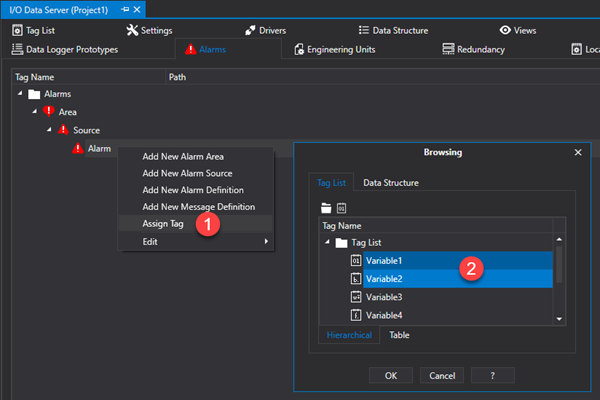
From the "Alarm" resource: right click on the alarm and select "Assign Tag". This will open a dialog window allowing you to select one or more tags to associated to the alarm.
From the "Tag List" resource: select one or more tags and, right click to open a contextual menu and select "Assign Alarm Definition". A "Assign Alarm" dialog window will open allowing you to select one or more alarms to the tag.

Assign Alarm Window
The 'Assign Alarm' window has various options.
Assign Mode
"Single"
The alarm is assigned to the entire tag.
"AnyTagBit"
The alarm is associated to each bit of the tag, therefore the same number of thresholds will be created as there are variable bits.
"AnyTagElement"
The alarm is associated to each element of the array type tag, therefore the same number of thresholds will be created as there are array elements.
Set Alarm Text
The 'Set Alarm Text' textbox permits you to set a text to associated to the alarm as a prefix.
This text will be completed with a incremental numeric '.n' suffix based on the element to which the is associated. l'allarme.
Alarm text prefix
This is used to define the alarm's text prefix to be used for each new alarm threshold (leave blank to use predefined value).
Alarm Threshold Properties
Once an Alarm Definition has been associated to the Tags, the alarm associated to each individual Tag can be configured in its properties as indicated below:
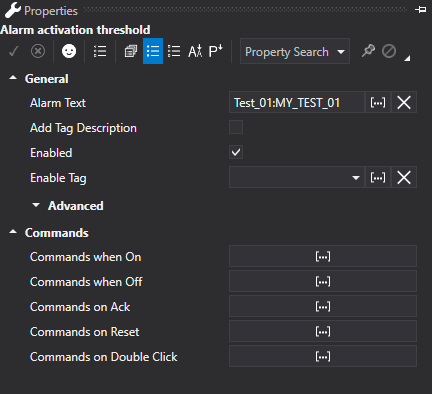
An Alarm Threshold Configuration Window
General
In the General Settings window of the alarm threshold section it is possible to define and configure the parameters relating to the management of the most common properties of the alarm thresholds.
The text to be shown as the alarm's text is inserted in this field. This text will be displayed in the Alarm Window and will be saved in the project's Historical Log. In cases where this field is left empty, the alarm text will be composed by the name of the Tag followed by the name of the alarm (eg. TagName:AlarmDefinitonName). When a custom text is inserted in this field, it will be displayed within brackets at the side of the alarm threshold's name in the Address Space window.
|
A static text and a String ID can be inserted in the "Alarm Text" field for managing language changes. When performing a project language change, the alarm texts already displayed in the Alarm Window will be refreshed with the current language or refreshed by using the Alarm Window's Refresh command or by reloading the Screen. |
When this option is selected, the Tag Description will be used as the alarm's text. This function may be very handy when importing Tags from the field devices (e.g. PLC) tag list. The importer also imports by device tag description if any are used to identify the alarm type.
This check-box is used for enabling or disabling the alarm in question.
This field is used for selecting a project Tag based on which the alarm is disabled or enabled during Runtime. The alarm is disabled when the Tag is set with the zero value and enabled when the Tag is set with another value that is not zero.
Low Activation Value Tag (Advanced)
This edit box is only shows when the "Between" condition has been selected in the Alarm Definition's "Activation Condition" property. It is used to insert (or select using the "..." browse button on the right) the name of the variable whose value will be used instead of the one in the Alarm Definition's "Low Activation Value" property. This will make the Threshold value dynamic in a way that it will take the contents of the variable that can then be changed at Runtime.
When this field is left empty, the contents in the Alarm Definition's "Low Activation Value" property will be considered.
This field is only avaiable when the 'Trip' type alarm is selected.
Activation Value Tag (Advanced)
This edit box is used to insert (or select with the "..." browse button on the right) the name of the variable whose value will be used instead of the one defined in the Alarm Definition's "Activation Value" property. This will make the threshold value dynamic so that the variable contents can be modified during Runtime.
When this field is left empty, the contents of the Alarm Definition's "Activation Value" property will be considered as the fixed threshold.
When a Trip alarm type is selected, only one "Activation Tag Value" field will show. When other alarm types are selected, four different "Activation Tag Value" type fields will show, one for each threshold intervention (High-High Limit Tag, High Limit Tag, Low Limit Tag, Low-Low Limit Tag).
One or more variables can be inserted in this field and whose value will be displayed at runtime in the alarm text. The placeholder must be inserted in the alarm text to then be replaced by the Tag's value. The placeholder is defined by the number of tag's position in the Tag list shown within brackets (e.g. {0}). For example if the following text is inserted in the 'Alarm Text' property like so:
Alarm 1 Active. Minimum value = {0}, maximum value = {1}.
The two “TagValMin” and “TagValMax” tags are inserted in the Alias Tag List respectively. When the alarm activates in runtime, the placeholder in the text that appears in the Alarm will be replaced by the “TagValMin” tag's value and placeholder
{1} will be replaced by the “TagValMax” tag's value .
|
If a 'String ID' is inserted in the 'Alarm Text' property, any placeholders should to be inserted in the strings of the string table for each defined language. |
Enable When Good Quality (Advanced)
This is used to enable/disable the alarm management based on the recording quality. When the variable's quality is not 'good', the alarm will not be managed.
This option is used for setting the alarm beep sound when activated or not. The options are:
UseDefault: selecting this mode the alarm sound will be inherited from the analogic setting in the Alarm Definition with which the threshold was defined with.
ForseTrue: selecting this mode the alarm sound will be executed independently from the analogic setting in the Alarm Definition with which the threshold was defined with.
ForceFalse: selecting this mode the alarm sound will not be executed independently from the analogic setting in the Alarm Definition with which the threshold was defined with.
This entry field is used for inserting an expression to enable access to the Tag bit or Array element. For example, the alarm Tag may be a Word type, whereby every single bit corresponds to one single alarm, or an Array type with elements corresponding to different alarms.
The syntax used for accessing the Tag bit is <.BitNum>. For example, inserting ".1" in this field means that the alarm will be controlled according to the status of the associated Tag Bit 1. In order to manage more than one alarm bit in the same Tag you will need to assign the same number of alarm templates as there are bits to be managed to the Tag and then specify each of these alarm templates with one of these bits. For example to manage 16 bit of a word you will have to assign 16 alarm templates to the Tag and then assign a different bit in each threshold specified in the Expression.
The syntax for accessing an Array Tag element is <[element]>. For example when inserting "[1]" in the field, the alarm will be controlled according to the status of the Array Tag's 1 element. The elements are numbered starting with zero, therefore an Array of 5 elements will be numbered from 0 to 4.
It is also possible to insert an expression to extrapolate a value based on the Tag value associated to the alarm. These expressions must have a syntax like the one used in expressions in objects (see "Expressions in Objects"). An example of this syntax type could be:
= SQRT([x])
where the [x] parameter will be replaced with the value of the Tag associated to the alarm. In this case, the alarm's activation value will therefore be the square root of the Tag's value.
Commands
Below is a list of the commands that can be set for the alarm thresholds:
|
Commands are always executed within the Client. Up to the version 4.0.298 included, commands are not executed by Clients started with the "-start -client" option. Starting from version 4.0.300 included, the commands are executed by all clients connected to the I/O Data Server, regardless of whether they are local or remote. |
Commands when On
This property is used to associate commands to the alarm threshold to execute when "ON"
Commands when Off
This property is used to associate commands to the alarm threshold to execute when "OFF"
Commands on Ack
This property is used to associate commands to the alarm threshold to execute when Acknowledged.
Commands on Reset
This property is used to associate some commands to the alarm threshold to execute when reset..
Commands on Double Click
This property is used to associate commands to your alarm threshold to execute when double clicked within the alarm window.