Movicon.NExT Help on Line - Rel. 4.3
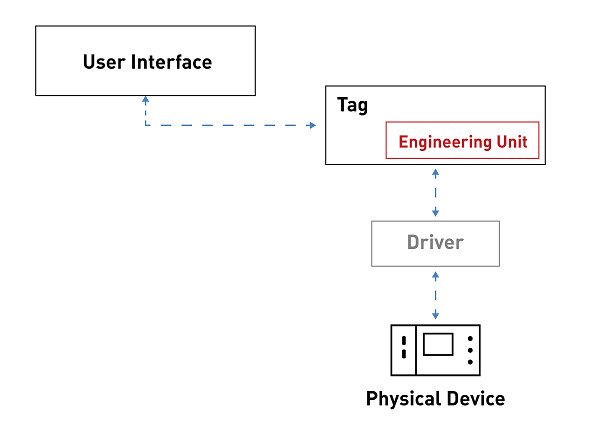
Engineering units are scaled models (aka linear transformation or scaling) that are applied to Tags.
By means of using the Engineering Unit, the Tag connected to the field through a communication driver will be scaled according its the settings.
The Raw range is the value range on the device and the Scaled range is the value range in the project's I/O Data Server.
For example, A Tag that has values in the range of 0-1000 on the device and the range of values on the I/O Data Server is 0-100, the formula will be: Tag Value = Device Value/10
|
Engineering units are useful because they allow the minimum and maximum values of many objects from the toolbox to be configured automatically. |
To create a new Engineering Unit simply open the I/O Data Server Engineering Resource and select 'Add Engineering Unit' from the contextual menu.
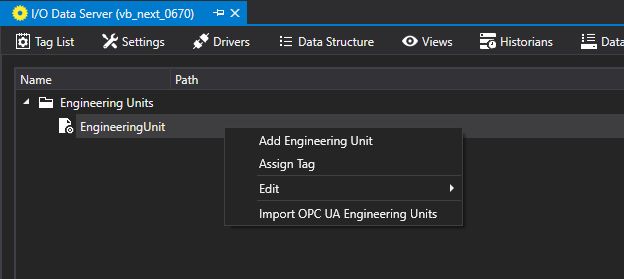
Once the Engineering Unit has been inserted, you can configure the properties as described below.
Engineering Unit Properties
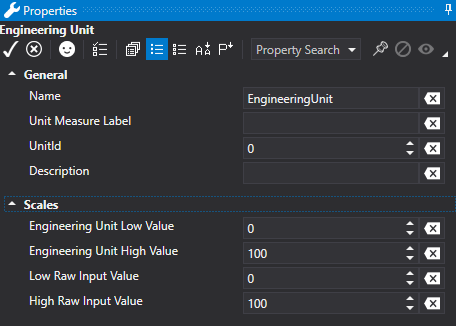
Name
This is used to define the name to assign to the engineering unit.
Unit Measure Label
This is used to define a text (or an abbreviation) that indicates the unit of measure that will be displayed in the objects from the toolbox to be associated to the Tag which uses the engineering unit.
Unit ID
This is the U.I's unique ID according to the OPC UA standard.
Description
This contains the U.I. description according to the OPC UA standard.
Scale
Engineering Unit Low Value (Advanced)
This is used to define the minimum value that the Tag will be able to obtain in the I/O Data Server.
Engineering Unit High Value (Advanced)
This is used to define the maximum value that the Tag will be able to obtain in I/O Data Server.
Low Raw Input Value (Advanced)
This is used to define the minimum value that the Tag assumes on the Device.
High Raw Input Value (Advanced)
This is used define the maximum value that the Tag assumes on the Device.
Assigning Engineering Units to Tags
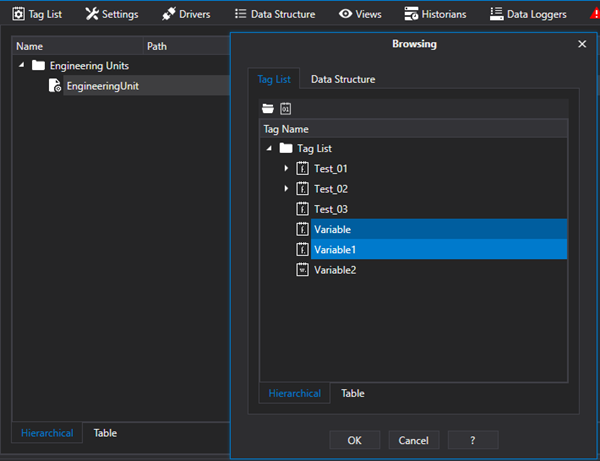
Right click on the Engineering Unit within the 'Engineering Units' resource and then select 'Assign Tag'.
This will open a dialog window through which you can select one or more variables to assign to the Engineering Unit.
|
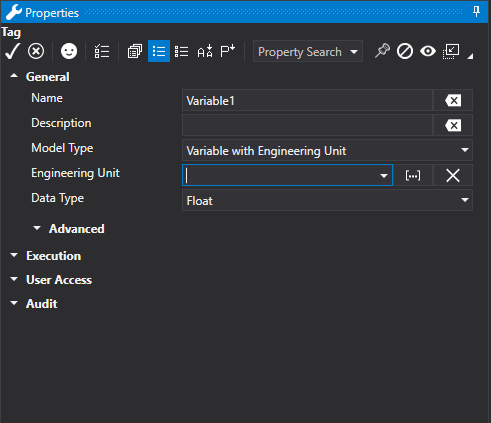
Engineering Units can only be associated to Tags that are "Variable with Engineering Unit" model types and not "Bool" or "String" types. |
As an alternative, you can use the "Tag List" resource to select one or more variables that are "Variable with Engineering Unit" model types and select the desired resource from the "Engineering Unit" item in the properties window.
Importing engineering units from csv. files according to the OPC UA standard
Select the Import Engineering Unit item according to the OPC UA standard from the contextual menu to open the following window with which you can import a list of Engineering Units from a csv.file.
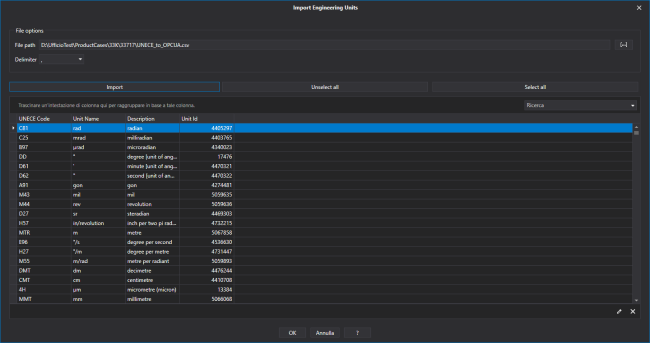
Once the grid underneath has populated, you will be able to select the Engineering Unit to import which will be added to the list of U.I.. This window also provides the option to select all the rows or or only some of them.
|
This tool can import the "UNECE_to_OPCUA.csv" file available from the OPC UA foundation at this link:
http://www.opcfoundation.org/UA/EngineeringUnits/UNECE/UNECE_to_OPCUA.csv
|


