
Array bit or element pointing is supported for both IOServer variables and Local Client variables.
Movicon.NExT Help on Line - Rel. 4.3
Movicon.NExT supports the possibility to specify and assign a single bit of a byte, word, or double variable type or a single element of a data Array when assigning Tag variables to symbols or objects.
|
Array bit or element pointing is supported for both IOServer variables and Local Client variables. |
Pointing to bits
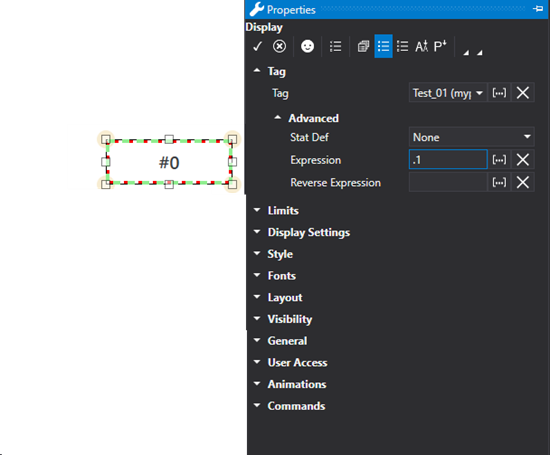
To specify the bit of a Tag variable assigned to a symbol or an object, you wil need to use the "Expression" field in the actual object's or Symbol's Properties Window.
|
The bit numbers (starting with 0) to be assigned must be entered in the Expression field after a dot. For example bit 1 should be inserted as ".1". |
|
The "Reverse Expression" field is not necessary in this case and should be left empty. |
With Expressions with complex formulas you will need to use the BITAND function in order to use bits within logic functions (see paragraph on "Other Expressions"). For example:
=AND(BITAND([x],4), BITAND([x],16))
This expression executes a AND logic between the bit 2 and the bit 4 of the variable [x] (because 2^2 = 4 and 2^4 = 16).
This type of expression is to be used in substitution of a "=AND([x].2, [x].4)" expression type which is not allowed.
=OR(BITAND([x],8), BITAND([x],16))
This expression executes an OR logic between the bit 3 (because 2^3 = 8) and the bit 4 of the variable [x] (because 2^4 = 16).
This type of expression is to be sued in substitution of a "=AND([x].3, [x].4)" express type which is not allowed.
The "[x]" placeholder represents the value of the Tag associated to the object's Tag property.
Pointing to Array elements
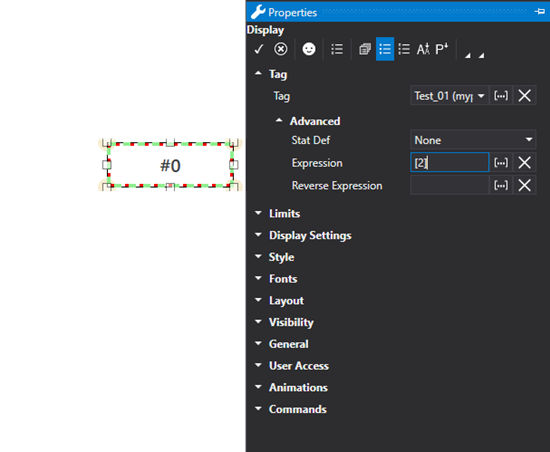
Analogously to pointing to a variable bit, you can assign an element of a Array type Tag variable. Also in this case, after having associated the Array variable to the object, you should the insert the number of the elementto be pointed to in the "Expression" field by indicating it within square brackets.
For example, to point to the first Array element, in other words element 0, you will need to insert the "[0]" syntax. .
|
The index of an Array always starts with “0”. Therefore, when you have an Array with “5” elements, you must use the indexes that start from "0" to "4" to access them.
|
Array elements can also be used within logic functions and other functions such as:
= AND([x(2)], [2:Tags/2:myBoolArr(3)])
This expression executes an AND logic between element 2 of the "[x]" array with element 3 of the "2:Tags/2:myBoolArr" array.
= AND([x(2)], [x(3)])
This expression executes an AND logic between element 2 of the "[x]" array with the element 3 of the "[x]" array. The "[x]" placeholder represents the value of the Tag associated to the object's Tag property.


