Movicon.NExT Help on Line - Rel. 4.3
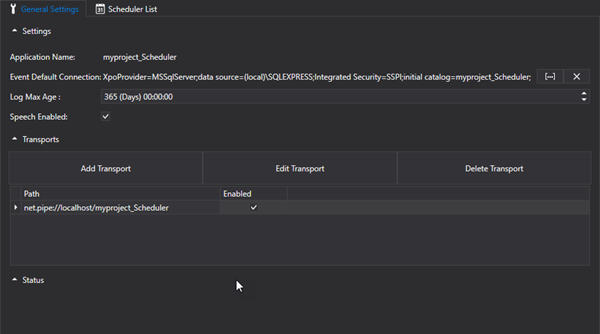
As an OPC UA Server, the Scheduler resource provides a Settings Configuration section in its workspace. This section is devided into three areas of which the main one is dedicated to the OPC UA Server's general settings.
This section has two subsections, one of which allows you to set any "Transports" that the OPC UA Server must use for communicating with the platform, and the other one shows the OPC UA Server's "Status" by reporting its system Log messages.
Client Configuration
When starting Movicon Client up on a remote machine, you will first need to define a network transport (e.g. opc.tcp) in the Scheduler's Server and add an AppName Renamed specifically for the Scheduler Scheduler, in addition to the one for the I/O Server, being the one indicated in the Scheduler Server's Application Name specified as follows.
General Settings
The Command Scheduler's OPC UA Server's general parameters can be defined and configured in the "Settings" window.
This is the name of the Server application. This will be the name with which the Scheduler's OPC UA Server will be shown in the OPC UA Client browser list.
This is the connection string that will be used by the Scheduler Server for recording event log data. When the editor is opened without a predefined connection string, one will be inserted for default. This default connection will be created in the database configured for default in the Movicon installation and the "Appication Name" will be used as the name for the database.
If the database connection should disconnect for whatever reason while in Runtime, the log data will be downloaded in xml files in the project's "..\SchedulerServer\Historian" folder.
This indicates the maximum age of historical data recorded on the Database. Data older than the value set will be progressively deleted.
When this option is enabled, the scheduler events will be vocally enunciated during their execution at runtime.
Users Server DB Connection (Advanced)
This is used to set the connection string to the Membership Authentication Server OPCUA.
Manufacturer Name (Advanced)
This is used to define the name of the manufacturer. This information will be published by the Server OPCUA.
Product Name (Advanced)
This is used to enter the product's name. This information will be published by the Server OPCUA.
Product URL (Advanced)
This allows you set an Uri for the product/manufacturer (published by the server).
Software Version (Advanced)
This is used to define the software product version. This information will be published by the Server OPCUA.
Build Number (Advanced)
This is used to enter the build number.
Transports
This window is used to define the protocols that are to be used for Server and Client communication. Once the Server has been started up, it will provide end-points according to the transports enabled in the project.
|
Attention! The "net.pipe" transport is a local transport which required both Client and Server to be started up in the same work session. This transport cannot be used if the Client project and Server project run on different machines. |
Status
This is a log window which activates when the Server is started up manually using the "Start Server" command and reports Server status or error messages.

