Movicon.NExT Help on Line - Rel. 4.3
APP installation
The Movicon.NEXT WebClient app can be installed on tablets, smartphones and wearable devices (e.g. the Hololens) by accessing the below stores:
App Store for iOS devices
Play Store for Android devices
Microsoft Store for Microsoft devices
App Configuration
When starting up the App for the first time, the below image will show:
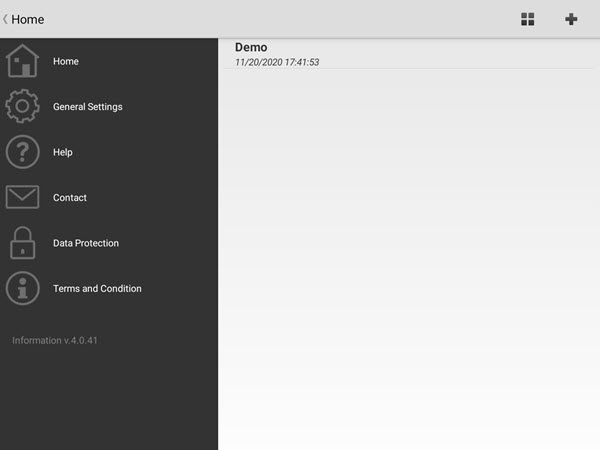
The following menus are presented on the left:
Home: this allows you to access and configure the connection profiles.
General Settings: this allows you to configure the app's general settings.
Help: a brief guide that shows you how to manage the profiles.
Contact: this allows you to send an email to Technical Support.
Data Protection: this shows the cookies and privacy policies.
Terms and Condition: shows the app's terms and conditions of use.
At the top on the right you will find:
A button for sorting profiles (e.g by creation date),
A button to add a new profile as shown in the below screenshot.
To edit or delete an existing profile, simply long press the profile.
This will prompt default profile to show with the name of "Demo" that will allow you to test the use of the app with a project published online by default.
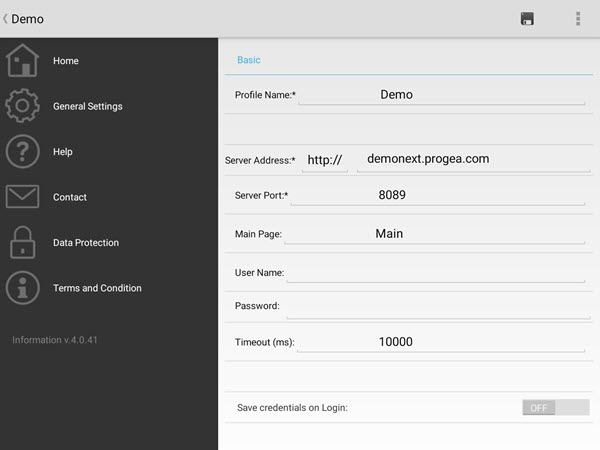
The connection Profile settings are:
Profile Name = the name to assign to the profile
Server Address = protocol (http or https) to use and the server address to connect to. When you use the HTTPS protocol, you will need to obtain a certificate issued by a Certificate Authority (CA) and follow the steps indicated in the "Using HTTPs certificates for the App Service" paragraph in the "Deploying Projects".
Server Port = indicates the TCP port on with the Apps' service listens on. The default port for HTTP connections is 8089, while the default port for HTTPS is 8090.
Main Page = indicates the project page which will open at startup.
User Name/Password = username and password to use for accessing the project when user management is active in project. When username and password are not specified, a login window will show at startup.
Timeout = indicates the connection timeout to the Apps' service in milliseconds.
Save Credentials on Login = allows the username and password to be saved when used in the Login window.
If the user wishes to edit the profile settings using the keyboard only, they should:
Press the ALT key to make numbers appear at the side of each field to distinguish each one and by selecting one of these using the keyboard, they will be able to access the field in edit mode;
The first editable field will be highlighted when the detailed page opens. Once confirming with the "Enter" key, the next text field will automatically be selected so that the form can be quickly filled in by using the keyboard only.
Within the "General Settings" window shown below:
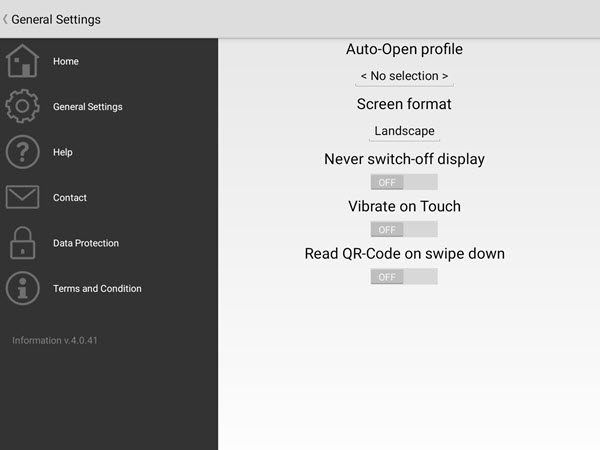
you will be able to define other parameters which include:
Auto Open Profile = drop-down menù with which the user can select the profile that will open automatically when starting up the app.
Screen Format = screen display format
Never Switch Off Display = this allows the Display to stay always active in the apps where there is no user interaction happening. This is can only be used in IOS systems (however, the device settings will override this property type).
Vibrate on Touch = activates vibration when touched (however, the device settings will override this property type).
Read QR-Code on Swipe down = this is used to activate the device's camera for reading QR code by using the "swipe down" command.
