IDKB000033.htm
Question:
Why can't other PCs be accessed in network when Movicon is launched as Service?
Answer:
When Movicon is launched as Windows service, attempts to access files or folders on other PCs over the net may fail. This is due to the fact that when an application is started up as service using system users, their logon is executed with null credentials causing any access to the remote PC resources to fail. To remedy this problem the folders, which must be accessed on the remote PC, must be configured as described below to allow remote access by connecting anonymously:
Let's suppose that the Movicon Application has to access, in read/write, files contained in the remote PC's "FileShared" folder. The settings to enter on this remote PC would be:
-
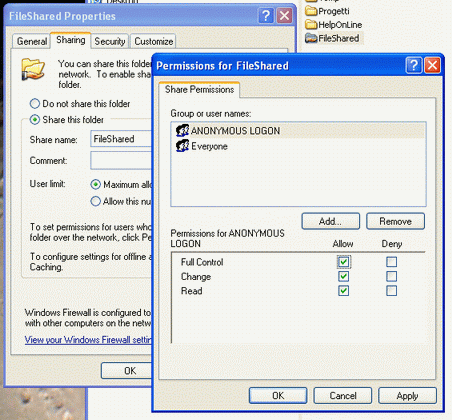
Share folder by inserting "Everyone" and "ANONYMOUS LOGON" users with complete access rights in the Share Permissions:
-
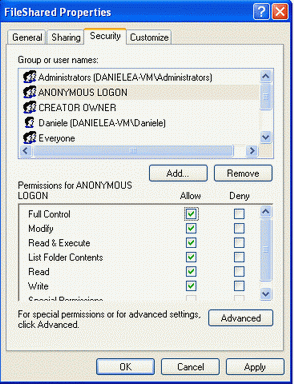
Add the "Everyone" and "ANONYMOUS LOGON" users with complete access rights to the folder's Security:
-
Add the name of the ""FileShared" folder to the "Network Access: Shares that can be accessed anonymously" protection policy. Use the control panel to access the policy with this path: "control panel - administrative tools - Local Security Policy - Security Options":
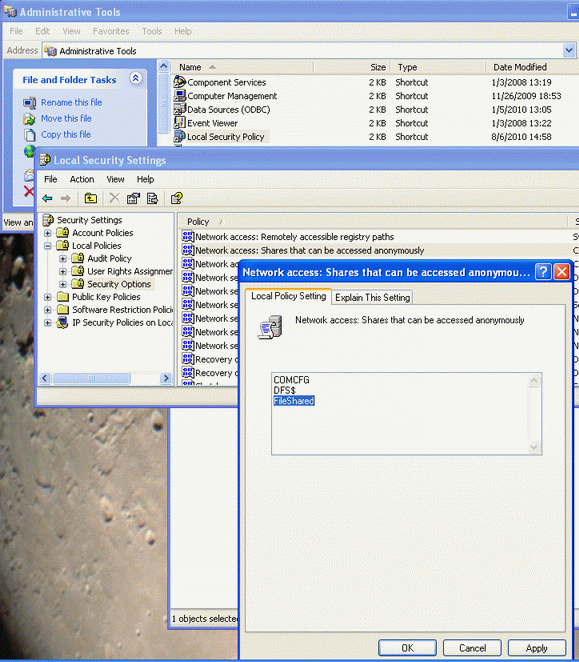
Once the settings have been entered, as described above, it will be possible to access this folder in read/write from other applications launches as service as well.
References:
|
Additional query words: |
Service, Network, File Sharing |
|
|
|
